Page 1 of 1
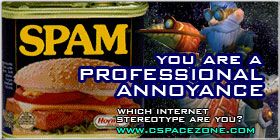
new sig its knd of cool, what u think?
#1
Posted 20 February 2006 - 02:54 AM
Well me and my friend ikbis have started making our own sigs with imageshack, and Gimp(parents wont let either of us get photoshop
. That's why we changed it to co-begining pixel artist, because im just helping out. Anyways, I think my new sig is pretty cool. What do you think. Oh, and i want the truth is the Molten Stell Halo thing cool or lame?

^^^^^^^^second sig i evry made on my own=D(more to come)^^^^^^^^^
http://www.cspacezon...ns/DarkSide.jpg
#2
Posted 20 February 2006 - 06:28 AM
Looks good, but I have a few small suggestions.
1. Try putting the image on a transparent background instead of white. Make sure to save in PNG format though; GIF doesn't support alpha-transparency (meaning, with GIF, each pixel must be either fully opaque or fully transparent -- with PNG you can use partial transparency, which is good for the shadow effect and for smoothing around the edge of the image).
This adds the problem, though, that Internet Explorer doesn't handle PNG properly (it ignores transparency and puts the image on a solid background). So Firefox and other users will see your image as intended, while IE users will see it as it is now.
You can use GIF, but then you lose the alpha-transparency. The edge of the image may become jaggy, and the shadow will look like crap (on a white background it will look fine, but people on this board all use different themes -- and I don't think any of them have white backgrounds
).
2. The text is jaggy. You should be able to adjust anti-aliasing somewhere; unfortunately, I use Photoshop, so I can't tell you how to do it on GIMP. For Photoshop it's along with font size, style, etc. :-\ It's probably in a similar place for GIMP.
Have fun
1. Try putting the image on a transparent background instead of white. Make sure to save in PNG format though; GIF doesn't support alpha-transparency (meaning, with GIF, each pixel must be either fully opaque or fully transparent -- with PNG you can use partial transparency, which is good for the shadow effect and for smoothing around the edge of the image).
This adds the problem, though, that Internet Explorer doesn't handle PNG properly (it ignores transparency and puts the image on a solid background). So Firefox and other users will see your image as intended, while IE users will see it as it is now.
You can use GIF, but then you lose the alpha-transparency. The edge of the image may become jaggy, and the shadow will look like crap (on a white background it will look fine, but people on this board all use different themes -- and I don't think any of them have white backgrounds
2. The text is jaggy. You should be able to adjust anti-aliasing somewhere; unfortunately, I use Photoshop, so I can't tell you how to do it on GIMP. For Photoshop it's along with font size, style, etc. :-\ It's probably in a similar place for GIMP.
Have fun
Those who will remember, will speak fondly of the warm morning breeze.
#4
Posted 20 February 2006 - 11:52 AM
Phi, the problem is, when you take an image that was uploaded as anything other than a PNG from the internet, even if you change it, it still has slight variants of the color white, so it's interpreted as a new color. PNG then won't remove it. Everyone should use PNG.
HI! I'M BACK SPORADICALLY! Nobody probably remembers me :(
#6
Posted 21 February 2006 - 12:09 AM
okey dokey!!!

^^^^^^^^second sig i evry made on my own=D(more to come)^^^^^^^^^
http://www.cspacezon...ns/DarkSide.jpg
#11
Posted 15 March 2006 - 08:37 PM
dont post in old topics...period...
u can see if they r old by seeing where they are on the list of topics and the last post date
Some people are like slinkies. Not really good for anything but you can't help
but smile when you see one tumbling down the stairs.
Xbox Live Gamertag= Slay Mantus

but smile when you see one tumbling down the stairs.
Xbox Live Gamertag= Slay Mantus

Page 1 of 1
Sign In
Register
Help

MultiQuote